Posts

NSCP W64 ERC Entry Process | Toyota NSCP W64 ERC Unlock

Image
NavigationDisk If you need SD or code then please contact us now via Whats app Viber/Whatsapp: ( Live support) 8801672761737   [ Click to live chat ] For all latest details www.navigationdiskjp.com

NSCP W64 ERC Entry Process | Toyota NSCP W64 ERC Unlock

Image
NavigationDisk If you need SD or code then please contact us now via Whats app Viber/Whatsapp: ( Live support) 8801672761737   [ Click to live chat ] or For all latest details www.navigationdiskjp.com <?php get_footer();

Toyota NSCP W64 ERC - How to unlock step by step

Image
Toyota NSCP W64 ERC - How to unlock step by step --- Have shown you steps to reach to ERC menu / Unlock secret service menu  Contact US below: Whatsapp / Viber / LINE / iMessage 📱 +8801672761737 [ 24 hours ] Click to Chat https://api.whatsapp.com/send?phone=8801672761737&text=Blogger. ---------------------------------------------------------- 🌎 http://www.navigationdiskjp.com 📧 bdcar.bangladesh@gmail.com Your Toyota X Japan Car Radio NSCP W64 looks like this  - so its locked. Lets unlocked it in a minute  Press and hold this button (the bottom circled button in FIGURE 2) At the same time do the following operations 3 time using Car Tail light switch Turn ON - OFF Turn ON - OFF Turn ON - OFF FIGURE - 2 The parking / tail light switch just adjacent to your steering -  Once done - you should see the following sc...

Toyota NSCP W64 ERC - How to unlock step by step

Image
Toyota NSCP W64 ERC - How to unlock step by step --- Have shown you steps to reach to ERC menu / Unlock secret service menu  Please whatsapp me the 16  digit for the code  CONTACT---------------------------------------------------------- Whatsapp / Viber / LINE / iMessage 📱 +8801672761737 [ 24 hours ] Whatsapp Click here Chat now! https://api.whatsapp.com/send?phone=8801672761737&text=Blogger_W66_w68_enquiry. ---------------------------------------------------------- 🌎 http://www.navigationdiskjp.com 📧 bdcar.bangladesh@gmail.com Your Toyota X Japan Car Radio NSCP W64 looks like this  - so its locked. Lets unlocked it in a minute  Press and hold this button (the bottom circled button in FIGURE 2) At the same time do the following operations 3 time using Car Tail light switch Turn ON - OFF Turn ON - OFF Turn ON - OFF FIGURE - 2 The parking / tail light switch just ad...

Toyota NSCP W64 English Language

Image
Toyota NSCP W64 English Language If you need SD or code then please contact us now via Whats app Contact US below: Whatsapp / Viber / LINE / iMessage 📱 +8801672761737 [ 24 hours ] Click to Chat https://api.whatsapp.com/send?phone=8801672761737&text=Blogger. ---------------------------------------------------------- 🌎 http://www.navigationdiskjp.com 📧 bdcar.bangladesh@gmail.com #NSCPW64 #ToyotaLanguagechange

Toyota NSCP W64 English Language

Image
Toyota NSCP W64 English Language If you need SD or code then please contact us now via Whats app Viber/Whatsapp: ( Live support) 8801672761737   [ Click to live chat ] email :  bdcar.bangladesh@gmail.com or  sales@navigationdiskjp.com #NSCPW64 #ToyotaLanguagechange

NSCP W64 Quick Setup - How to skip it

Image
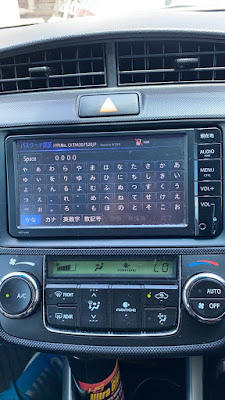
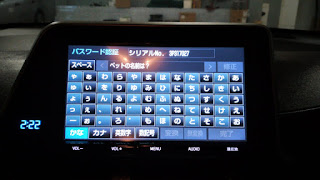
 Password setting Contact US below: Whatsapp / Viber / LINE / iMessage 📱 +8801672761737 [ 24 hours ] Click to Chat https://api.whatsapp.com/send?phone=8801672761737&text=Blogger. ---------------------------------------------------------- 🌎 http://www.navigationdiskjp.com 📧 bdcar.bangladesh@gmail.com First, enter the password hint (Fig. 3), then the password itself (Fig. 4). Check what we pointed there. Everything, protection is included.  If you forget the password, you can throw out the radio. Contact US below: Whatsapp / Viber / LINE / iMessage 📱 +8801672761737 [ 24 hours ] Click to Chat https://api.whatsapp.com/send?phone=8801672761737&text=Blogger. ---------------------------------------------------------- 🌎 http://www.navigationdiskjp.com 📧 bdcar.bangladesh@gmail.com

how to skip Toyota Navigation Radio Quick Setup menu

Image
 Password setting The default password is set on the radio.  Disconnect the battery - you need to enter a password.  I was lucky, and the good Japanese left a hint on the password (1111).  Password protection can be turned off altogether, but then the radio will display the QUICK START settings window each time the car is started, it will wildly infuriate.  But you can change the password. First, enter the password hint (Fig. 3), then the password itself (Fig. 4). Check what we pointed there. Everything, protection is included.  If you forget the password, you can throw out the radio. Whatsapp me for the code 8801672761737  or emaik bdcar.bangladesh@gmail.com Thanks  NavigationDisk Research Team Bangaldesh

Toyota NSCP W64 Setting up parking lines

Image
Toyota NSCP W64 Setting up parking lines For the English SD map card of NSCP W64 please contact us now If you need SD or code then please contact us now via Whats app Viber/Whatsapp: ( Live support) 8801672761737   [ Click to live chat ] For all latest details www.navigationdiskjp.com Email:  bdcar.bangladesh@gmail.com Facebook: www.facebook.com/navigationdisk Steps  First you need to enter service mode.  To do this, hold and hold the one shown in fig.  1 button (a bunch of hieroglyphs) and turn on / off the dimensions 3 times. In fig.  4 select the top item to configure the car with a steering wheel sensor (dynamic parking lines).  The bottom point for cars without it - respectively, the parking lines will be static. n fig.  2 you are looking for your car, having previously learned in the t...

Toyota NSCP W64 Setting up parking lines

Image
Toyota NSCP W64 Setting up parking lines For the English SD map card of NSCP W64 please contact us now If you need SD or code then please contact us now via Whats app Viber/Whatsapp: ( Live support) 8801672761737   [ Click to live chat ] or For all latest details www.navigationdiskjp.com Email:  bdcar.bangladesh@gmail.com Facebook: www.facebook.com/navigationdisk Steps  First you need to enter service mode.  To do this, hold and hold the one shown in fig.  1 button (a bunch of hieroglyphs) and turn on / off the dimensions 3 times. In fig.  4 select the top item to configure the car with a steering wheel sensor (dynamic parking lines).  The bottom point for cars without it - respectively, the parking lines will be static. n fig.  2 you are looking for your car, having previously learned in the translator what its Japanese name looks like.  If it is not, ...

Toyota DSZT y64T ERC Unlock Step by step

Image
Toyota DSZT y64T ERC Unlock If you need SD or code then please contact us now via Whats app Contact US below: Whatsapp / Viber / LINE / iMessage 📱 +8801672761737 [ 24 hours ] Click to Chat https://api.whatsapp.com/send?phone=8801672761737&text=Blogger. ---------------------------------------------------------- 🌎 http://www.navigationdiskjp.com 📧 bdcar.bangladesh@gmail.com

Toyota DSZT y64T ERC Unlock Step by step

Image
Toyota DSZT y64T ERC Unlock If you need SD or code then please contact us now via Whats app Viber/Whatsapp: ( Live support) 8801672761737   [ Click to live chat ] email :  bdcar.bangladesh@gmail.com or  sales@navigationdiskjp.com email : sales@navigationdisk.com

Toyota DSZT y64T ERC Unlock step by step

Image
Contact US below: Whatsapp / Viber / LINE / iMessage 📱 +8801672761737 [ 24 hours ] Click to Chat https://api.whatsapp.com/send?phone=8801672761737&text=Blogger. ---------------------------------------------------------- 🌎 http://www.navigationdiskjp.com 📧 bdcar.bangladesh@gmail.com