March 19, 2020

Japanese Nissan Xtrail Original SD CARD 513/512/314 25920 SD Card MM514-DL, nissan xtrail,

Nissan Xtrail 2017 SD map Card Unlocked

we are only world leading Japan Car Audio / Navi Solution provider
Connect us via whatsapp / dial ( 24 hours available )
If you need SD or code then please contact us now via Whats app

Viber/Whatsapp: ( Live support)

8801672761737 [ Click to live chat ]

or


For all latest details

#NissanXtrail
#XtrailSD


March 13, 2020

NSCP W64 ERC Entry Process | Toyota NSCP W64 ERC Unlock

NavigationDisk
If you need SD or code then please contact us now via Whats app

Viber/Whatsapp: ( Live support)

8801672761737 [ Click to live chat ]


For all latest details


NSCP W64 ERC Entry Process | Toyota NSCP W64 ERC Unlock

NavigationDisk
If you need SD or code then please contact us now via Whats app

Viber/Whatsapp: ( Live support)

8801672761737 [ Click to live chat ]

or


For all latest details


<?php get_footer();

Toyota NSCP W64 ERC - How to unlock step by step

Toyota NSCP W64 ERC - How to unlock step by step
---


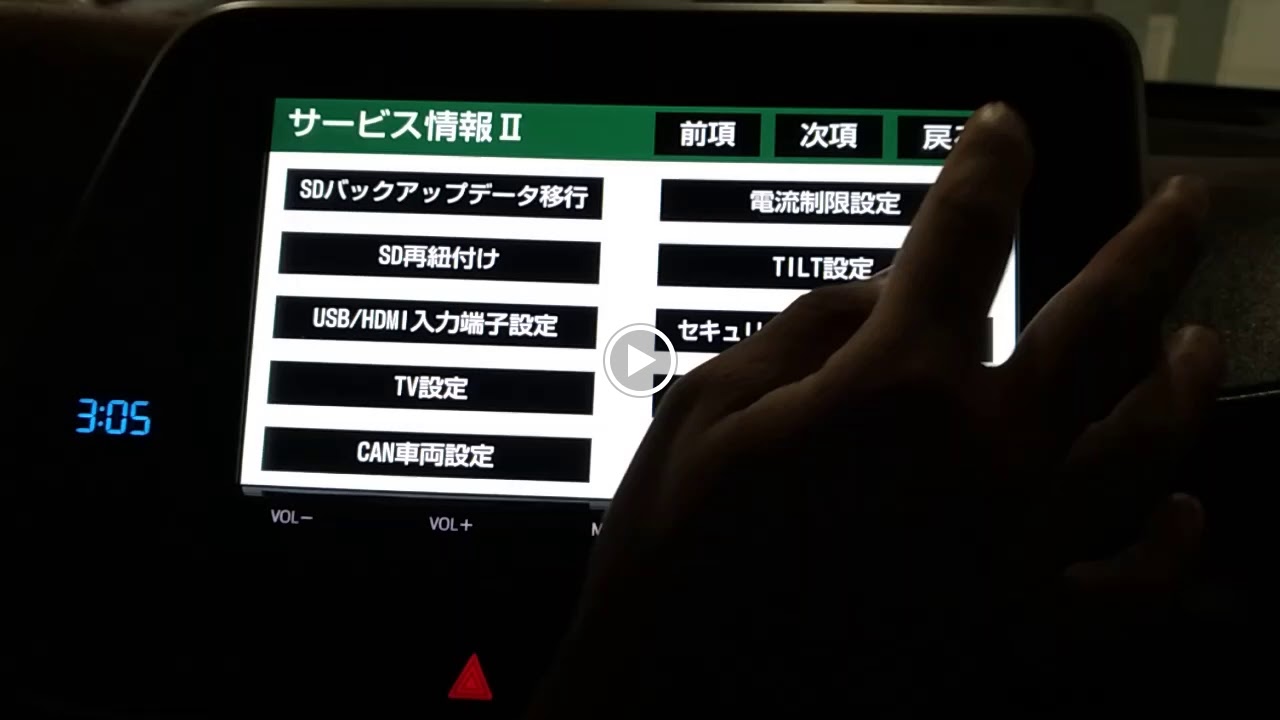
Have shown you steps to reach to ERC menu / Unlock secret service menu 

Contact US below: Whatsapp / Viber / LINE / iMessage 📱 +8801672761737 [ 24 hours ] Click to Chat https://api.whatsapp.com/send?phone=8801672761737&text=Blogger. ---------------------------------------------------------- 🌎 http://www.navigationdiskjp.com 📧 bdcar.bangladesh@gmail.com


Your Toyota X Japan Car Radio NSCP W64 looks like this  - so its locked. Lets unlocked it in a minute 


Press and hold this button (the bottom circled button in FIGURE 2)
At the same time do the following operations 3 time using Car Tail light switch
Turn ON - OFF
Turn ON - OFF
Turn ON - OFF

FIGURE - 2

The parking / tail light switch just adjacent to your steering - 

Once done - you should see the following screen - 
Press the BLACK Button


Now Again Press the BLACK Button


Voila! - you are on the ERC Menu 
Share this 16 digit secret code with me - to get the unlock code


After entering the 8 DIGIT ERC Code you will see following screen
Press the 2nd button


Have a look ERC Entering Process


Toyota NSCP W64 ERC - How to unlock step by step

Toyota NSCP W64 ERC - How to unlock step by step
---


Have shown you steps to reach to ERC menu / Unlock secret service menu 

Please whatsapp me the 16  digit for the code 

CONTACT---------------------------------------------------------- Whatsapp / Viber / LINE / iMessage 📱 +8801672761737 [ 24 hours ] Whatsapp Click here Chat now!


Your Toyota X Japan Car Radio NSCP W64 looks like this  - so its locked. Lets unlocked it in a minute 


Press and hold this button (the bottom circled button in FIGURE 2)
At the same time do the following operations 3 time using Car Tail light switch
Turn ON - OFF
Turn ON - OFF
Turn ON - OFF

FIGURE - 2

The parking / tail light switch just adjacent to your steering - 

Once done - you should see the following screen - 
Press the BLACK Button


Now Again Press the BLACK Button


Voila! - you are on the ERC Menu 
Share this 16 digit secret code with me - to get the unlock code


After entering the 8 DIGIT ERC Code you will see following screen
Press the 2nd button


Have a look ERC Entering Process


Toyota NSCP W64 English Language

Toyota NSCP W64 English Language

If you need SD or code then please contact us now via Whats app

Contact US below: Whatsapp / Viber / LINE / iMessage 📱 +8801672761737 [ 24 hours ] Click to Chat https://api.whatsapp.com/send?phone=8801672761737&text=Blogger. ---------------------------------------------------------- 🌎 http://www.navigationdiskjp.com 📧 bdcar.bangladesh@gmail.com


#NSCPW64 #ToyotaLanguagechange


Toyota NSCP W64 English Language

Toyota NSCP W64 English Language

If you need SD or code then please contact us now via Whats app

Viber/Whatsapp: ( Live support)

8801672761737 [ Click to live chat ]

email : bdcar.bangladesh@gmail.com
or sales@navigationdiskjp.com


#NSCPW64#ToyotaLanguagechange


March 10, 2020

NSCP W64 Quick Setup - How to skip it

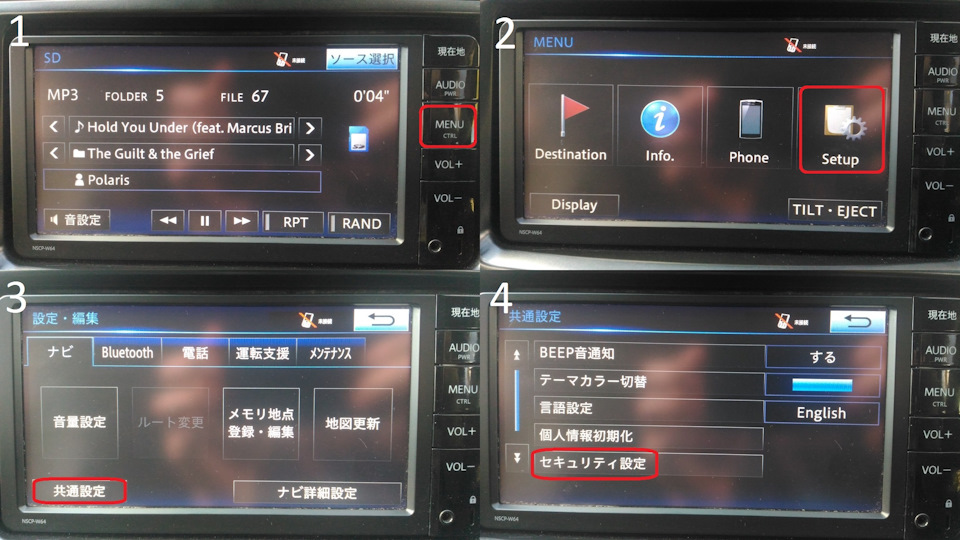
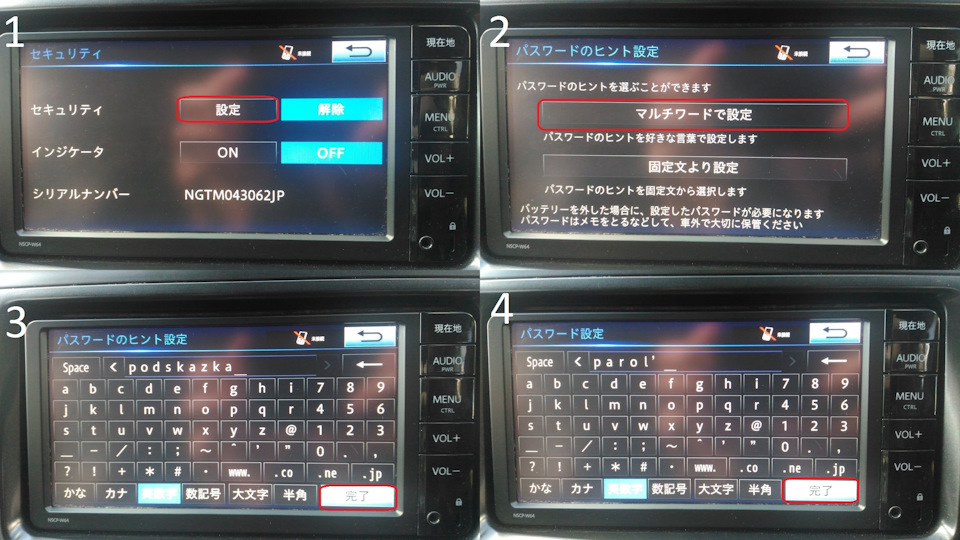
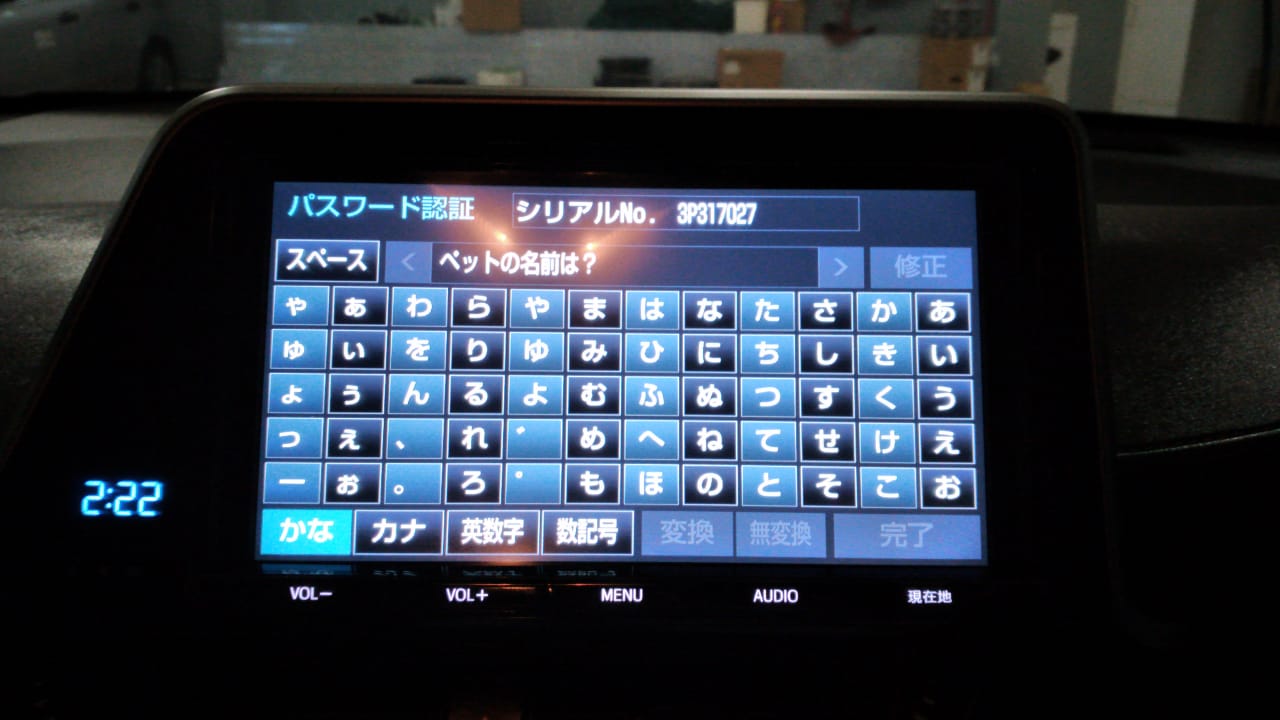
 Password setting
Contact US below: Whatsapp / Viber / LINE / iMessage 📱 +8801672761737 [ 24 hours ] Click to Chat https://api.whatsapp.com/send?phone=8801672761737&text=Blogger. ---------------------------------------------------------- 🌎 http://www.navigationdiskjp.com 📧 bdcar.bangladesh@gmail.com


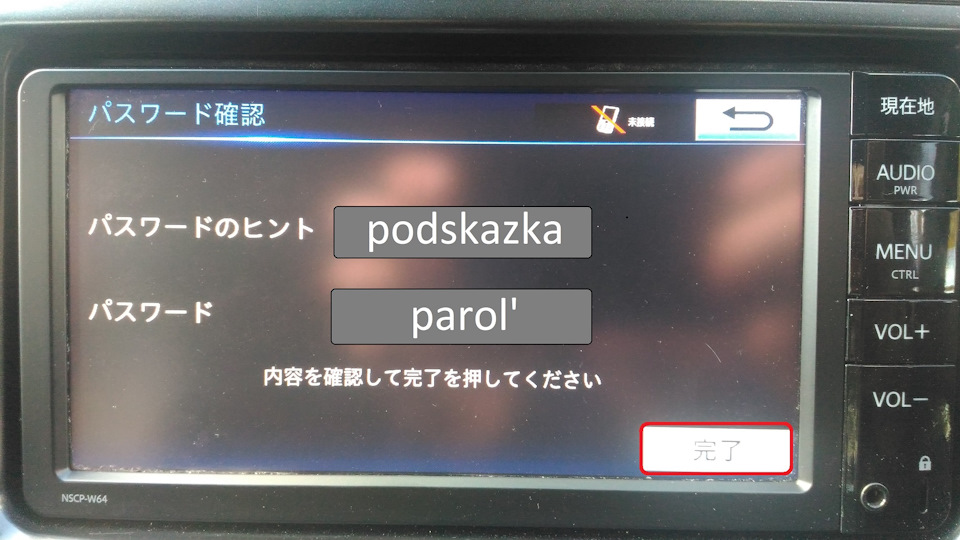
First, enter the password hint (Fig. 3), then the password itself (Fig. 4).
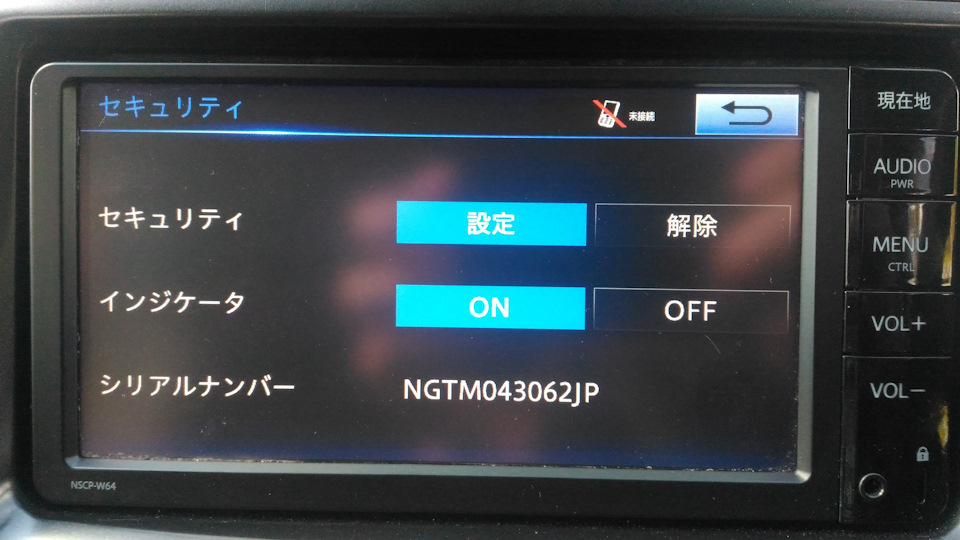
Check what we pointed there.


Everything, protection is included. If you forget the password, you can throw out the radio.

Contact US below: Whatsapp / Viber / LINE / iMessage 📱 +8801672761737 [ 24 hours ] Click to Chat https://api.whatsapp.com/send?phone=8801672761737&text=Blogger. ---------------------------------------------------------- 🌎 http://www.navigationdiskjp.com 📧 bdcar.bangladesh@gmail.com

how to skip Toyota Navigation Radio Quick Setup menu

 Password setting
The default password is set on the radio. Disconnect the battery - you need to enter a password. I was lucky, and the good Japanese left a hint on the password (1111). Password protection can be turned off altogether, but then the radio will display the QUICK START settings window each time the car is started, it will wildly infuriate. But you can change the password.


First, enter the password hint (Fig. 3), then the password itself (Fig. 4).
Check what we pointed there.


Everything, protection is included. If you forget the password, you can throw out the radio.

Whatsapp me for the code 8801672761737 
or emaik bdcar.bangladesh@gmail.com

Thanks 
NavigationDisk Research Team Bangaldesh

Toyota NSCP W64 Setting up parking lines

Toyota NSCP W64 Setting up parking lines


For the English SD map card of NSCP W64 please contact us now


If you need SD or code then please contact us now via Whats app

Viber/Whatsapp: ( Live support)

8801672761737 [ Click to live chat ]


For all latest details

Email:  bdcar.bangladesh@gmail.com
Facebook: www.facebook.com/navigationdisk


Steps 

First you need to enter service mode. To do this, hold and hold the one shown in fig. 1 button (a bunch of hieroglyphs) and turn on / off the dimensions 3 times.
In fig. 4 select the top item to configure the car with a steering wheel sensor (dynamic parking lines). The bottom point for cars without it - respectively, the parking lines will be static.


n fig. 2 you are looking for your car, having previously learned in the translator what its Japanese name looks like. If it is not, go back one step (Fig. 1) and select the right item.
In fig. 3 choose a complete set. In fig. 4 we begin to configure:
Put the steering wheel straight and click on the item to the left. Then turn the steering wheel to the left as much as possible and press the hieroglyphs on the right. Next, turn the steering wheel as far as possible to the right and again press the character on the right. If everything is done correctly, the radio will go to the camera position settings.


Here we set the arrows:
- the red rectangle should be a meter away from the car parallel to the back of the car
- the right and left sides of the red rectangle should be aligned with the sides of the car
For convenience, you can put boards, for example, as a continuation of the sides of the car or bluntly draw on the ground.
After you have completed the setup, press the confirm button.


Contact US below: Whatsapp / Viber / LINE / iMessage 📱 +8801672761737 [ 24 hours ] Click to Chat https://api.whatsapp.com/send?phone=8801672761737&text=Blogger. ---------------------------------------------------------- 🌎 http://www.navigationdiskjp.com 📧 bdcar.bangladesh@gmail.com

Toyota NSCP W64 Setting up parking lines

Toyota NSCP W64 Setting up parking lines


For the English SD map card of NSCP W64 please contact us now


If you need SD or code then please contact us now via Whats app

Viber/Whatsapp: ( Live support)

8801672761737 [ Click to live chat ]


or


For all latest details

Email:  bdcar.bangladesh@gmail.com
Facebook: www.facebook.com/navigationdisk


Steps 

First you need to enter service mode. To do this, hold and hold the one shown in fig. 1 button (a bunch of hieroglyphs) and turn on / off the dimensions 3 times.
In fig. 4 select the top item to configure the car with a steering wheel sensor (dynamic parking lines). The bottom point for cars without it - respectively, the parking lines will be static.


n fig. 2 you are looking for your car, having previously learned in the translator what its Japanese name looks like. If it is not, go back one step (Fig. 1) and select the right item.
In fig. 3 choose a complete set. In fig. 4 we begin to configure:
Put the steering wheel straight and click on the item to the left. Then turn the steering wheel to the left as much as possible and press the hieroglyphs on the right. Next, turn the steering wheel as far as possible to the right and again press the character on the right. If everything is done correctly, the radio will go to the camera position settings.


Here we set the arrows:
- the red rectangle should be a meter away from the car parallel to the back of the car
- the right and left sides of the red rectangle should be aligned with the sides of the car
For convenience, you can put boards, for example, as a continuation of the sides of the car or bluntly draw on the ground.
After you have completed the setup, press the confirm button.


Toyota DSZT y64T ERC Unlock Step by step


Toyota DSZT y64T ERC Unlock

If you need SD or code then please contact us now via Whats app

Contact US below: Whatsapp / Viber / LINE / iMessage 📱 +8801672761737 [ 24 hours ] Click to Chat https://api.whatsapp.com/send?phone=8801672761737&text=Blogger. ---------------------------------------------------------- 🌎 http://www.navigationdiskjp.com 📧 bdcar.bangladesh@gmail.com


Toyota DSZT y64T ERC Unlock Step by step


Toyota DSZT y64T ERC Unlock

If you need SD or code then please contact us now via Whats app

Viber/Whatsapp: ( Live support)

8801672761737 [ Click to live chat ]

email : bdcar.bangladesh@gmail.com
or sales@navigationdiskjp.com
email : sales@navigationdisk.com


Latest Car Radio Solution

Locked out of your Honda Gathers navigation system?

  Locked out of your Honda Gathers navigation system? Don’t let a security code stop your drive. Navigationdisk provides professional, relia...

Popular Top rated Solutions