August 24, 2019

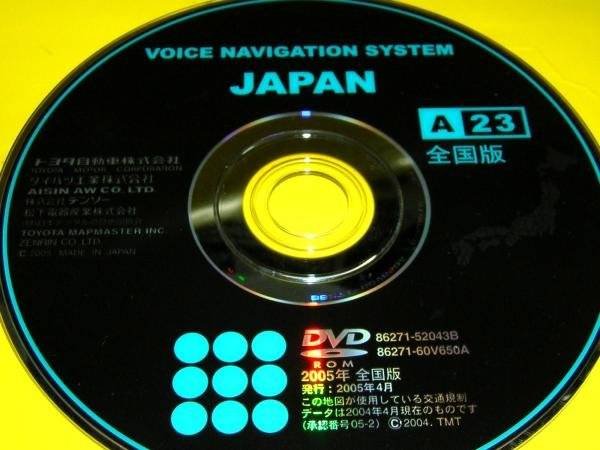
Solution for NDDN-W57 "Please insert correct map disc" - Voice Navigation System JAPAN (NDDN-W57)

Solution for NDDN-W57 "Please insert correct map disc" - Voice Navigation System JAPAN (NDDN-W57)

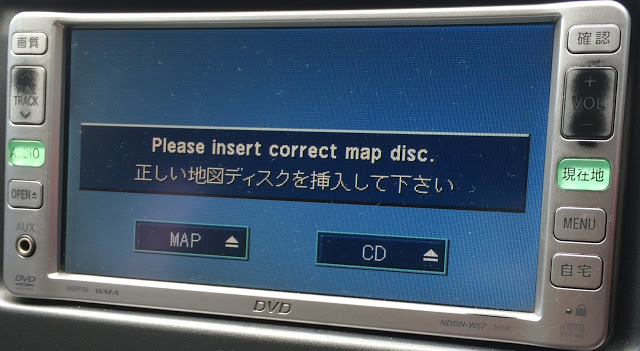
We have the software solution if your car double din deck that has Radio, DVD, Television, Touch Screen deck displays the error message shown below:


 "Please insert correct map disc."


This message normally appears when replacing the car battery or if anyone of the terminal(s) connected to the battery has been removed or detached for a short period of time.

Model #: NDDN-W57 

Contact me bdcar.bangladesh@gmail.com

Whatsapp +8801672761737


Please note, we were unable to locate the translation from Japanese to English for this model of deck NDDN-W57.
Contact me bdcar.bangladesh@gmail.com


Whatsapp +8801672761737

"PLEASE INSERT CORRECT MAP DISC" ERROR.

SOLUTION FOR "PLEASE INSERT CORRECT MAP DISC" ERROR.

Do You Have Japanese Navigational Units In your car but cannot use them because of the 


"PLEASE INSERT CORRECT MAP DISC" ERROR.


If you need SD or code then please contact us now via Whats app

Viber/Whatsapp: ( Live support)


For all latest details


You have come to the right place.

We have the permanent solution for NDDN , NDCN , ND3T, = W54,W55,W56,W57 or W58, Pioneer Carrozzeria AVIC systems and a variety of Eclipse Units.

You probably got this error after purchase of a new car,  disconnected the battery terminals. Sometimes it happens due to the power fluctuation in car's ICU.

We have It's Solution Now and fix it within minutes. Available World wide


There is no need to replace your Audio Unit. Contact us for a Quick and Honest Service.

We have solutions for the following Model Numbers:
Toyota Navigation Models

Contact me bdcar.bangladesh@gmail.com
or web : navigationdiskjp.com
Whatsapp +8801672761737


ND3N-D53/W53
NDCT-D53/W53
NDCT-W53E
ND3A-W54A
ND3T-D54/W54
NDCN-D54/W54
NDCT-W54E
ND3A-W54A
ND3T-D54/W54
NDCN-D54/W54
NDCT-W54E
ND3T-W55
NDCN-D55/W55
NDDA-W55
ND3T-W55
NDCN-D55/W55
NDDA-W55
ND3T-W56
NDDA-W56
NDDN-W56
ND3T-W56
NDDA-W56
NDDN-W56
ND3T-W57
NDDN-W57
ND3T-W57
NDDN-W57
NDDN w58
NSDN w59
NSDN w60
NSCN w59
Pioneer AVIC Systems
Eclipse Units

"PLEASE INSERT CORRECT MAP DISC" ERROR.

SOLUTION FOR "PLEASE INSERT CORRECT MAP DISC" ERROR.

Do You Have Japanese Navigational Units In your car but cannot use them because of the 


"PLEASE INSERT CORRECT MAP DISC" ERROR.


If you need SD or code then please contact us now via Whats app

Viber/Whatsapp: ( Live support)


For all latest details


You have come to the right place.

We have the permanent solution for NDDN , NDCN , ND3T, = W54,W55,W56,W57 or W58, Pioneer Carrozzeria AVIC systems and a variety of Eclipse Units.

You probably got this error after purchase of a new car,  disconnected the battery terminals. Sometimes it happens due to the power fluctuation in car's ICU.

We have It's Solution Now and fix it within minutes. Available World wide


There is no need to replace your Audio Unit. Contact us for a Quick and Honest Service.

We have solutions for the following Model Numbers:
Toyota Navigation Models

Contact me bdcar.bangladesh@gmail.com
or web : navigationdiskjp.com
Whatsapp +8801672761737


ND3N-D53/W53
NDCT-D53/W53
NDCT-W53E
ND3A-W54A
ND3T-D54/W54
NDCN-D54/W54
NDCT-W54E
ND3A-W54A
ND3T-D54/W54
NDCN-D54/W54
NDCT-W54E
ND3T-W55
NDCN-D55/W55
NDDA-W55
ND3T-W55
NDCN-D55/W55
NDDA-W55
ND3T-W56
NDDA-W56
NDDN-W56
ND3T-W56
NDDA-W56
NDDN-W56
ND3T-W57
NDDN-W57
ND3T-W57
NDDN-W57
NDDN w58
NSDN w59
NSDN w60
NSCN w59
Pioneer AVIC Systems
Eclipse Units

Solution for NDDN-W54 "Please insert correct map disc" - Voice Navigation System JAPAN (NDDN-W54)

Solution for NDDN-W54 "Please insert correct map disc"

We have the software solution if your car double din deck that has Radio, DVD, Television, Touch Screen deck displays the error message shown below:


If you need  then please contact us now via Whats app

Viber/Whatsapp: ( Live support)


For all latest details


 "Please insert correct map disc."


This message normally appears when replacing the car battery or if anyone of the terminal(s) connected to the battery has been removed or detached for a short period of time.

Model #: NDDN-W54 

Contact me bdcar.bangladesh@gmail.com


Whatsapp +8801672761737


Please note, we were unable to locate the translation from Japanese to English for this model of deck NDDN-W54

Solution for NDDN-W54 "Please insert correct map disc" - Voice Navigation System JAPAN (NDDN-W54)

Solution for NDDN-W54 "Please insert correct map disc"

We have the software solution if your car double din deck that has Radio, DVD, Television, Touch Screen deck displays the error message shown below:


If you need  then please contact us now via Whats app

Viber/Whatsapp: ( Live support)


For all latest details


 "Please insert correct map disc."


This message normally appears when replacing the car battery or if anyone of the terminal(s) connected to the battery has been removed or detached for a short period of time.

Model #: NDDN-W54 

Contact me bdcar.bangladesh@gmail.com


Whatsapp +8801672761737


Please note, we were unable to locate the translation from Japanese to English for this model of deck NDDN-W54

Solution for NDDN-W56 "Please insert correct map disc" - Voice Navigation System JAPAN A26 (NDDN-W56)

Solution for NDDN-W56 "Please insert correct map disc" - Voice Navigation System JAPAN A26 (NDDN-W56)


We have the software solution if your car double din deck that has Radio, DVD, Television, Touch Screen deck displays the error message shown below:

NavigationDisk Software available

 "Please insert correct map disc."


This message normally appears when replacing the car battery or if anyone of the terminal(s) connected to the battery has been removed or detached for a short period of time.

Model #: NDDN-W56 

Contact US below: Whatsapp / Viber / LINE / iMessage 📱 +8801672761737 [ 24 hours ] Click to Chat https://api.whatsapp.com/send?phone=8801672761737&text=Blogger. ---------------------------------------------------------- 🌎 http://www.navigationdiskjp.com 📧 bdcar.bangladesh@gmail.com


Please note, we were unable to locate the translation from Japanese to English for this model of deck NDDN-W56.

Solution for NDDN-W56 "Please insert correct map disc" - Voice Navigation System JAPAN A26 (NDDN-W56)

Solution for NDDN-W56 "Please insert correct map disc" - Voice Navigation System JAPAN A26 (NDDN-W56)


We have the software solution if your car double din deck that has Radio, DVD, Television, Touch Screen deck displays the error message shown below:

NavigationDisk Software available

 "Please insert correct map disc."


This message normally appears when replacing the car battery or if anyone of the terminal(s) connected to the battery has been removed or detached for a short period of time.

Model #: NDDN-W56 

Please email:  sales@navigationdiskjp.com


whatsapp : +8801672761737
Web : www.navigationdiskjp.com
FAcebook :www.facebook.com/navigationdisk

Please note, we were unable to locate the translation from Japanese to English for this model of deck NDDN-W56.

August 22, 2019

Toyota NSZT W66T X66 X66T Y66 W66 Radio and SD Available

Toyota NSZT W66T X66 X66T Y66 W66 Radio and SD 


If you need SD or code then please contact us now via Whats app

Viber/Whatsapp: ( Live support)

8801672761737 [ Click to live chat ]


For all latest details


Toyota NSZT W66T X66 X66T Y66 W66 Radio and SD Available

Toyota NSZT W66T X66 X66T Y66 W66 Radio and SD 


If you need SD or code then please contact us now via Whats app

Viber/Whatsapp: ( Live support)

8801672761737 [ Click to live chat ]


For all latest details


Mitsubishi NR-VZ801MCD DVD navi - Map Softcopy

Mitsubishi NR-VZ801MCD DVD navi - 
Map Softcopy

Contact us via
WeChat :Navidisk
or Whatsapp +8801672761737


Mitsubishi NR-VZ801MCD DVD navi - Map Softcopy

Mitsubishi NR-VZ801MCD DVD navi - 
Map Softcopy

Contact us via
WeChat :Navidisk
or Whatsapp +8801672761737


Toyota NSZT W66 English Review by NavigationDisk CTO


Toyota NSZT W66 English Review 

by NavigationDisk CTO


Contact us to grab SD or radio
Whatsapp : +8801672761737

mail : bdcar.bangladesh@gmail.com or Click here to mail direct to us www.navigationdiskjp.com/contact-us


Toyota NSZT W66 English Review by NavigationDisk CTO


Toyota NSZT W66 English Review 

by NavigationDisk CTO


Contact us to grab SD or radio
Whatsapp : +8801672761737

mail : bdcar.bangladesh@gmail.com or Click here to mail direct to us www.navigationdiskjp.com/contact-us


August 17, 2019

Toyota NSZT W66 English SD card | NSZT W66T ERC Unlock Code


Toyota NSZT W66 English SD card | NSZT W66T ERC Unlock Code 

Toyota NSZT W66

Contact US below: Whatsapp / Viber / LINE / iMessage 📱 +8801672761737 [ 24 hours ] Click to Chat https://api.whatsapp.com/send?phone=8801672761737&text=Youtube. ---------------------------------------------------------- 🌎 http://www.navigationdiskjp.com 📧 bdcar.bangladesh@gmail.com


Toyota NSZT W66 English SD card and Unlock Code


Toyota NSZT W66 SD card and Unlock Code


mail us or contact us direct here www.navigationdiskjp.com/contact-us


July 25, 2019

Toyota Multi AV Station NDCN-W55

Toyota Multi AV Station NDCN-W55

Contact for file

whatsapp +8801672761737


  1. NDCN-W55
  2. NDCT-W54e
  3. ND3T-D54
  4. ND3T-W54
  5. NDCN-W54
Description : Loader for Japanese car Toyota NDCN-W55. 
Add. Information : Need for reanimation of the radio after disconnecting the battery or disconnecting the power from the radio itself. 
Symptoms - the inscription on the screen "Please insert correct map disk". 
Burn to CD-R / CD-RW, insert into the card drive (MAP). 
After some time, the radio will come to life.

Toyota Multi AV Station NDCN-W55

Toyota Multi AV Station NDCN-W55

Contact for file

whatsapp +8801672761737


  1. NDCN-W55
  2. NDCT-W54e
  3. ND3T-D54
  4. ND3T-W54
  5. NDCN-W54
Description : Loader for Japanese car Toyota NDCN-W55. 
Add. Information : Need for reanimation of the radio after disconnecting the battery or disconnecting the power from the radio itself. 
Symptoms - the inscription on the screen "Please insert correct map disk". 
Burn to CD-R / CD-RW, insert into the card drive (MAP). 
After some time, the radio will come to life.

July 14, 2019

Pioneer Carrozzeria AVIC DRZ Software Download link

Pioneer Carrozzeria AVIC DRZ80 (90) ,AVIC-DRZ80 (AVIC_DRZ90)


For Software please contact us 

Whatsapp us for the Download link 
or


For all latest details

#Web: https://navigationdiskjp.com
#Email : sales@navigationdiskjp.com


Pioneer Carrozzeria AVIC DRZ80 (90) ,AVIC-DRZ80 (AVIC_DRZ90)


Pioneer Carrozzeria AVIC DRZ80 (90), Map disk now available to download


Developer

: Pioneer

Year: 2004

System requirements : AVIC DRZ80, AVIC DRZ90

Boot disk for Japanese, recorder, Pioneer Carrozzeria AVIC-DRZ80 (AVIC_DRZ90).

Language : Japanese


please contact with me and leave your email


bdcar.bangladesh@gmail.com


or viber +8801672761737


Latest Car Radio Solution

To function correctly, the **Eclipse AVN133MW** r

To function correctly, the **Eclipse AVN133MW** requires a specific **Map SD card** containing the navigation software and license data. If ...

Popular Top rated Solutions