Unlock Japan Car Stereo Online AND JDM PARTS , ECU. We sell Toyota ERC, Honda Gathers Code, Alpine Code, Pioneer sd and code, VW Codes, AUDI Codes, Etc. Contact us via Chat now
Search Car Radio Fix
April 8, 2015
April 1, 2015
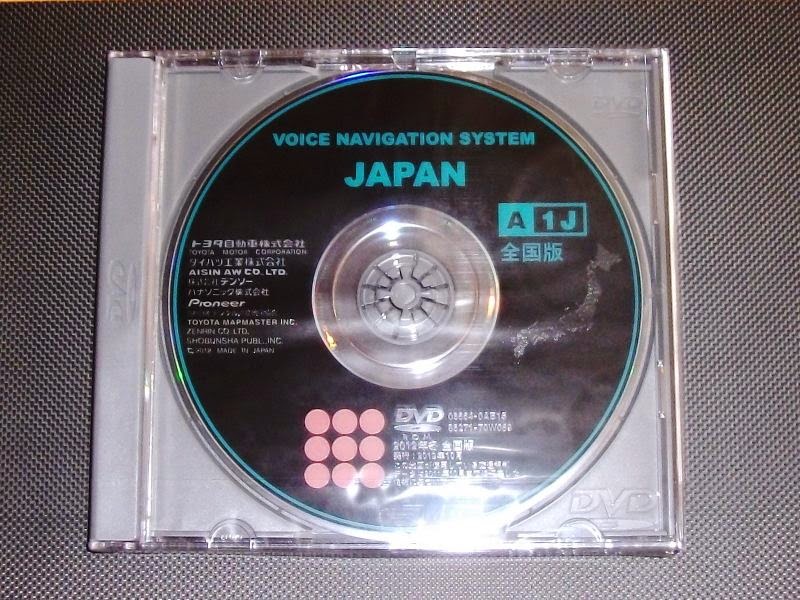
Toyota Navigation Disk Map NDCN, corona, premio, allion, sienta, voxy, noah, ipsum, NDCN, NDCT, ND3N, ND3A, NDDN, ND3T, NSDN, NHDT, NDDP, NHMP, NDKT, NDKT, NHDP, GCN, NCKT, NCMT, NHDA, NHZT, NH3N, NSCN
To get un-lock code of Japanese Radio (Toyota, Nissan, Honda) - Fujitsu, Pioneer, Eclipse, Please contact us into the above number and share your navigation screen image
or mail us bdcar.bangladesh@Gmail.com
For Pricing and Details
-reach out to us any time. Whatsapp/Viber for faster reply
📱 +8801672761737 [ 24 hours ] [ 24 hour click to chat in whatsapp direct ]
📱 +61430386787 [ 24 hours ] [ 24 hour click to chat in whatsapp direct ]
Who we are ?
Japan Import Car Stereo-Navigation Unlock Solution for Toyota Honda Nissan, Subaru, Mazda, Mitsubishi BMW VW etc.
Services are we are offering online
1. Eclipse ESN,
2. Clarion Unlock Code,
3. Honda Gathers Unlock code ,
4. Kenwood Unlock Code.
5. Toyota ERC Unlock W68 Series online
6. Latest original SD master pro
7. All car Radio Map disk solution
Toyota Navigation Disk Map NDCN, corona, premio, allion, sienta, voxy, noah, ipsum, NDCN, NDCT, ND3N, ND3A, NDDN, ND3T, NSDN, NHDT, NDDP, NHMP, NDKT, NDKT, NHDP, GCN, NCKT, NCMT, NHDA, NHZT, NH3N, NSCN
If you need SD or code then please contact us now via Whats app
Viber/Whatsapp: ( Live support)
8801672761737 [ Click to live chat ]
+ 8801819199795
Check out our facebook for more updated information
Toyota Navigation Disk Map NDCN, corona, premio, allion, sienta, voxy, noah, ipsum, NDCN, NDCT, ND3N, ND3A, NDDN, ND3T, NMCT W50, NSDN, NHDT, NDDP, NHMP, NDKT, NDKT, NHDP, GCN, NCKT, NCMT, NHDA, NHZT, NH3N, NSCN ND3T-D54, ND3T-W54, ND3T-W55,NDCN-D55, NDCN-W54, NDCN-W55, NDCT-W54e, NDDA-W55, NDCN-W56 ,NDDN-W56,NHDT-W60G NHZA-W60G NHZN-W60G NSCN-W60-W60 NSDN
NSZD-W60, Dvd Navigation,Navigation Cd,Car Navigation, Navigation Disc,Honda Navigation ,Dvd Media,Toyota Navigation,Navigation Map, Jeep Navigation
Maker Model
TOYOTA
ND3N-D53 ND3N-W53 NDCT-D53 NDCT-W53
NDCT-W53E ND3T-D54 ND3T-W54 ND3T-W55
NDCN-D55 NDCN-W54 NDCN-W55 NDCT-W54e
NDCN-W56 NDDN-W56 ND3A-W54A ND3T-D54
ND3T-W54 NDCN-D54 NDCN-W54 NDCT-W54E
Viber/Whatsapp: ( Live support)
8801672761737 [ Click to live chat ]
+ 8801819199795
For all latest details
Check out our facebook for more updated information
www.facebook.com/navigationdisk
NSZD-W60, Dvd Navigation,Navigation Cd,Car Navigation, Navigation Disc,Honda Navigation ,Dvd Media,Toyota Navigation,Navigation Map, Jeep Navigation
Why Map disk?
Each time when we unplugged our battery terminal then Navigation memory wiped out!The solution is available. Payment Method : Paypal and Western Union.
Toyota Navigation Map Disk Model
mail me your details
bdcar.bangladesh@gmail.com
Viber Contact +8801672761737 24 hours available online
FaceBook Page for real time customer feedback Facebook Navigation Disk 24 hours available online
Toyota Navigation Disk Map NDCN, corona, premio, allion, sienta, voxy, noah, ipsum, NDCN, NDCT, ND3N, ND3A, NDDN, ND3T, NSDN, NHDT, NDDP, NHMP, NDKT, NDKT, NHDP, GCN, NCKT, NCMT, NHDA, NHZT, NH3N, NSCN
To get un-lock code of Japanese Radio (Toyota, Nissan, Honda) - Fujitsu, Pioneer, Eclipse, Please contact us into the above number and share your navigation screen image
or mail us bdcar.bangladesh@Gmail.com
March 31, 2015
T Harris from UK Paid 30 Punds for ND3T W54 - Owner of Smart Cars UK
Thanks MR T.Harris
PAid and received 30.97 Punds = 45$ USD from UK
Sold : ND3T W55 Map disk to resolve "insert map disk error "
Support : Via Skype / Team Viewer
T Harris from UK Paid 30 Punds for ND3T W54 - Owner of Smart Cars UK
Thanks MR T.Harris
PAid and received 30.97 Punds = 45$ USD from UK
Sold : ND3T W55 Map disk to resolve "insert map disk error "
Support : Via Skype / Team Viewer
March 22, 2015
How to Backup your Navigation DVD/CD
Written by
M.Shukarno Bin Shareef
A prominent Web leader in Navigation Market Software selling and consultancy industry. Bangladesh and in this subcontinent he is one of the keymaker of providing navigation solutions. Helping people and resolving their issues is his concern. Reach him bdcar.bangladesh@gmail.com
What You Need:
- A computer with a DVD+RW drive (a drive that can both readand write DVDs). I’ve successfully used a Samsung TSSTcorp CD/DVDw SH-s183L.
- DVD Decrypter – the original free DVD reading and decrypting software… and still the best.
- ImgBurn – a free, lightweight CD / DVD / HD DVD / Blu-ray burning application
- A blank dual-layer DVD (look for DVD+R DL on the package). Regular DVD+Rs will only hold 4.7GB of data, which isn’t enough for modern nav discs. A dual layer DVD+R DL will hold up to 8.5GB. I’ve successfully used Memorex DVD+R DL 8X discs, which are read as RITEK-S04-66 in ImgBurn.
Copy the Original Image:
- Put your original nav disc in your DVD+RW drive.
- Open DVD Decrypter. Make sure you’re using version 3.5.4.0 (final).
- From the Mode menu, select ISO, then Read.
- Choose the Destination on your hard drive for the backup image.
- Press the green “Play” button to decrypt and save the data to your computer. Depending on the speed of your DVD+RW drive and the amount of data it needs to read, this could take a while. Eventually, you’ll end up with two files: a large one that ends in .ISO and a small one that ends in .MDS. You’ll need both files later.
- Remove your original nav disc and store it in a safe place.
Burn the Backup Image:
- Insert a blank DVD+R DL disc into your DVD+RW drive.
- Open ImgBurn. These instructions are based on version 2.5.8.0 (released June 16, 2013).
- At the opening screen, select Write Image to Disc.
- If you have more than one DVD+RW drive, set the Destinationoption to the one that contains the blank disc.
- Click the small book icon in the lower right corner (if you hover your mouse over it, it says Change Book Type…).
- Select the tab for the manufacturer of your DVD+RW drive (check your Windows Device Manager and then Google the device name if you’re unsure of the manufacturer).
- Drop down the Change For: option list and select DVD+R DL Media.
- Drop down the New Setting: option list and select DVD-ROM.
- Press the Change button. You should get a “Success” message.
- Press the OK button to return to the main screen.
- Click the yellow folder icon to select the source file (if you hover if says Browse for a file…).
- Select the .MDS file you created above, which should be stored in the same folder as the .ISO file.
- Change the Write Speed under Settings to 1x (the program might automatically change this later, which is fine).
- Press the large “ISO to Disc” icon on the bottom left side to burn your backup image to the blank DVD.
The status screen will show you the progress of your burn. How long it takes depends upon a number of factors, including how much memory your system has, how fast your processor is, how many other processes are running, etc. I recommend not doing anything else on your system while the disc is burning, to reduce the chance of messing up the burn.
All Done!
How to Backup your Navigation DVD/CD
Written by
M.Shukarno Bin Shareef
A prominent Web leader in Navigation Market Software selling and consultancy industry. Bangladesh and in this subcontinent he is one of the keymaker of providing navigation solutions. Helping people and resolving their issues is his concern. Reach him bdcar.bangladesh@gmail.com
What You Need:
- A computer with a DVD+RW drive (a drive that can both readand write DVDs). I’ve successfully used a Samsung TSSTcorp CD/DVDw SH-s183L.
- DVD Decrypter – the original free DVD reading and decrypting software… and still the best.
- ImgBurn – a free, lightweight CD / DVD / HD DVD / Blu-ray burning application
- A blank dual-layer DVD (look for DVD+R DL on the package). Regular DVD+Rs will only hold 4.7GB of data, which isn’t enough for modern nav discs. A dual layer DVD+R DL will hold up to 8.5GB. I’ve successfully used Memorex DVD+R DL 8X discs, which are read as RITEK-S04-66 in ImgBurn.
Copy the Original Image:
- Put your original nav disc in your DVD+RW drive.
- Open DVD Decrypter. Make sure you’re using version 3.5.4.0 (final).
- From the Mode menu, select ISO, then Read.
- Choose the Destination on your hard drive for the backup image.
- Press the green “Play” button to decrypt and save the data to your computer. Depending on the speed of your DVD+RW drive and the amount of data it needs to read, this could take a while. Eventually, you’ll end up with two files: a large one that ends in .ISO and a small one that ends in .MDS. You’ll need both files later.
- Remove your original nav disc and store it in a safe place.
Burn the Backup Image:
- Insert a blank DVD+R DL disc into your DVD+RW drive.
- Open ImgBurn. These instructions are based on version 2.5.8.0 (released June 16, 2013).
- At the opening screen, select Write Image to Disc.
- If you have more than one DVD+RW drive, set the Destinationoption to the one that contains the blank disc.
- Click the small book icon in the lower right corner (if you hover your mouse over it, it says Change Book Type…).
- Select the tab for the manufacturer of your DVD+RW drive (check your Windows Device Manager and then Google the device name if you’re unsure of the manufacturer).
- Drop down the Change For: option list and select DVD+R DL Media.
- Drop down the New Setting: option list and select DVD-ROM.
- Press the Change button. You should get a “Success” message.
- Press the OK button to return to the main screen.
- Click the yellow folder icon to select the source file (if you hover if says Browse for a file…).
- Select the .MDS file you created above, which should be stored in the same folder as the .ISO file.
- Change the Write Speed under Settings to 1x (the program might automatically change this later, which is fine).
- Press the large “ISO to Disc” icon on the bottom left side to burn your backup image to the blank DVD.
The status screen will show you the progress of your burn. How long it takes depends upon a number of factors, including how much memory your system has, how fast your processor is, how many other processes are running, etc. I recommend not doing anything else on your system while the disc is burning, to reduce the chance of messing up the burn.
All Done!
March 19, 2015
Insert Correct Map disc/sd card NDDN W53/w54/w55/w56/w57/w58, NSDN W59/w60
Carrozzeria AVIC-DR01
2
Carrozzeria AVIC-DRV02
3
Carrozzeria AVIC-DRV05
4
Carrozzeria AVIC-DRZ08
5
Carrozzeria AVIC-DRZ09
!
Carrozzeria AVIC-DR001
6
Carrozzeria AVIC-DR10
!
Carrozzeria AVIC-DRV002
!
Carrozzeria AVIC-DRV005
7
Carrozzeria AVIC-DR11
8
Carrozzeria AVIC-DRV20
9
Carrozzeria AVIC-DRV20K
10
Carrozzeria AVIC-DRV22
11
Carrozzeria AVIC-DRV50
12
Carrozzeria AVIC-DRV55
13
Carrozzeria AVIC-DRZ80
14
Carrozzeria AVIC-DRZ90
15
Carrozzeria AVIC-DRZ90K
16
Carrozzeria AVIC-DR100
17
Carrozzeria AVIC-DRV120
18
Carrozzeria AVIC-DRV120K
19
Carrozzeria AVIC-DRV150
20
Carrozzeria AVIC-DRV150K
21
Carrozzeria AVIC-DR200
22
Carrozzeria AVIC-DRV220
23
Carrozzeria AVIC-DRV220K
24
Carrozzeria AVIC-DRV250
25
Carrozzeria AVIC-DRV250K
27
Carrozzeria AVIC-DR2000
28
Carrozzeria AVIC-DR2500
Наименование модели
Eclipse
29Eclipse AVN1106D
30
Eclipse AVN2204D
31
Eclipse AVN2205D
32
Eclipse AVN4404D
33
Eclipse AVN4405D
34
Eclipse AVN5504D
35
Eclipse AVN5505D
36
Eclipse AVN7701D
37
Eclipse AVN7702D
38
Eclipse AVN7703D
39
Eclipse UCNV884
40
Eclipse AVN4406D
Eclipse UCNV884mkII
Toyota
41TOYOTA ND3T-W52
42
TOYOTA ND3T-D52M
43
TOYOTA NVN-D52
44
TOYOTA NDCN-D54
45
TOYOTA ND3T-W54
46
TOYOTA ND3T-D54
47
TOYOTA NDCT-W54E
48
TOYOTA ND3A-W54A
49
TOYOTA NDCN-W54
50
TOYOTA NDCN-D55
51
TOYOTA ND3T-W55
52
TOYOTA NDDA-W55
53
TOYOTA NDCN-W55
54
TOYOTA NDDA-W56
55
TOYOTA NDDN-W56
56
TOYOTA ND3T-W56
57
TOYOTA NDDA-W57
58
TOYOTA NDDN-W57
59
TOYOTA ND3T-W57
Наименование модели
Honda
60Kenwood wx-034c
61
Gathers wx-034c
62
Gathers VXD-055C
Gathers VXD-065C
63
Gathers VXD-059MC
64
Gathers VXD-059MCV
65
Gathers VXD-069CV
66
Gathers VXD-069MCV
67
Gathers VXD-059CE
68
Gathers VXD-059CV
69
Gathers VXD-079MCV
Gathers VXD-085C
Gathers VXD-085CV
Mitsubishi
70Mitsubishi NR-VZ800MCD
71
Mitsubishi NR-VZ801MCD
72
Mitsubishi Multi Entertainment System M01
73
Mitsubishi NR-VZ600CD
For Pricing and Details
-reach out to us any time. Whatsapp/Viber for faster reply
📱 +8801672761737 [ 24 hours ] [ 24 hour click to chat in whatsapp direct ]
📱 +61430386787 [ 24 hours ] [ 24 hour click to chat in whatsapp direct ]
Who we are ?
Japan Import Car Stereo-Navigation Unlock Solution for Toyota Honda Nissan, Subaru, Mazda, Mitsubishi BMW VW etc.
Services are we are offering online
1. Eclipse ESN,
2. Clarion Unlock Code,
3. Honda Gathers Unlock code ,
4. Kenwood Unlock Code.
5. Toyota ERC Unlock W68 Series online
6. Latest original SD master pro
7. All car Radio Map disk solution
Subscribe to:
Posts (Atom)
Latest Car Radio Solution
Locked out of your Honda Gathers navigation system?
Locked out of your Honda Gathers navigation system? Don’t let a security code stop your drive. Navigationdisk provides professional, relia...
Popular Top rated Solutions
-
Toyota Navigation Disk Map NDCN, corona, premio, allion, sienta, voxy, noah, ipsum, NDCN, NDCT, ND3N, ND3A, NDDN, ND3T, NSDN, NHDT, NDDP, ...
-
Anis Momla From West Indies (For...
-
Toyota Genuine DVD navigation (NDCN-W54) If you need SD or code then please contact us now via Whats app Viber/Whatsapp: ( Live support...
-
SD Master Pro download Required Windows 10 system Working with passwords of SD cards, reading CID, Lock Unlock SD cards. Removal and install...
-
For Pricing and Details -reach out to us any time. Whatsapp/Viber for faster reply 📱 +8801672761737 [ 24 hours ] [ 24 hour click to ch...
-
Model Applied CLARION If you need SD or code then please contact us now via Whats app Please reach us if you need code / support / sd ...
-
Description toyota erc calculator ...
-
All Harrier SD Card and unlock ☎️ +8801672761737 📱 +61430386787 (click to chat in whatsapp now!!) 🌎 http://wa.me/8801672761737 📢 Why Onli...
-
Dear All the following navigation systems are available "navigation map disk " Please do contact with me through web or email ...
-
2. At the same time Turn on and off your parking light switch 3 times ( Please notice all the buttons ...